Getting Started
Run nightaudit init once. It finds your AI CLIs, asks which projects to
review and when, writes a config file, and offers to install the cron lines
that drive everything:
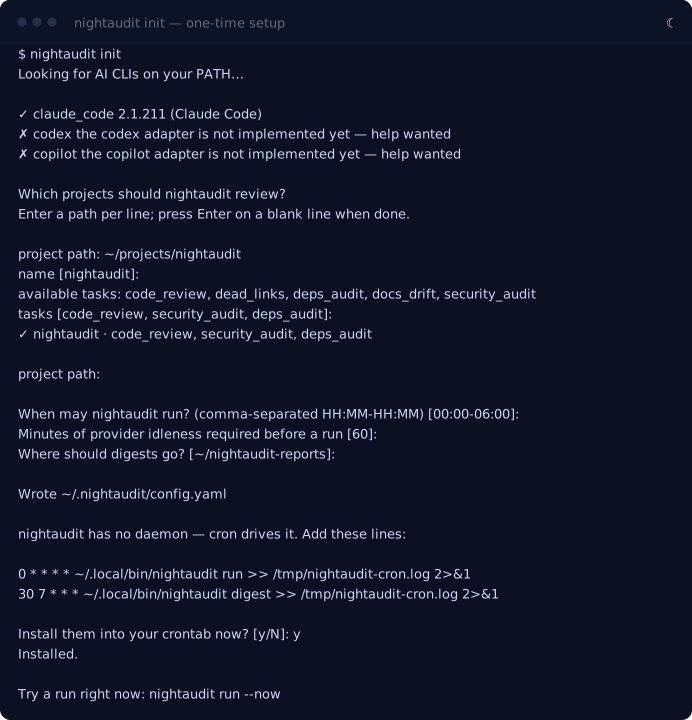
The project path is the only thing it needs from you. Everything else has a working default you can accept with Enter:
| It asks | It means | Default |
|---|---|---|
| project path | A repo to review. Enter as many as you like; blank line to finish. Or type scan <folder> to find every git repo under a folder and add them from a checklist. |
— |
| name | What to call it in the digest. | the directory's name |
| tasks | Which reviews to run on it. | code_review, security_audit, deps_audit |
| windows | Hours it's allowed to run, local time. | 00:00-06:00 |
| idle minutes | How long you must be away from Claude Code first. | 60 |
| digest dir | Where the morning digest lands. | ~/nightaudit-reports |
Everything it writes goes to ~/.nightaudit/config.yaml. Edit it by hand
whenever you like — it's plain YAML, and nightaudit status validates it.
See it work
Don't wait until tonight. Force a run right now:
nightaudit run --now
--now skips the window and idle checks, so you get a review immediately. At a
terminal, nightaudit streams it live — you see the same reads and reasoning you
would if you'd run claude yourself:
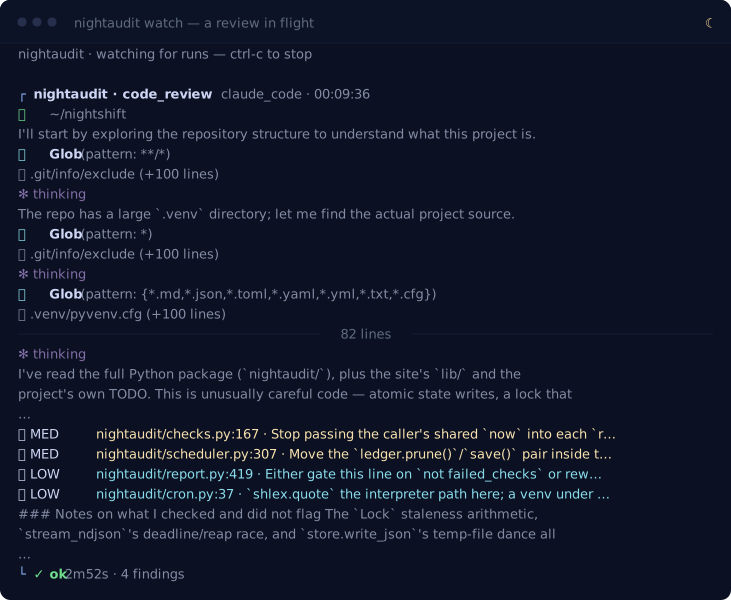
That is a real run of nightaudit against its own repository — every line of it,
including the part where it spends its first minute confused by a .venv and a
directory whose name no longer matches the package inside it.
Nothing red, this time. An earlier capture of the same review found two HIGH
bugs and both became commits that evening: a run that could hang forever holding
the scheduler's lock (claude_code.py:366, 13c0d3f) and a lock that could be
released by the wrong owner (lock.py:121, ff1ae5c). What is left is a shared
timestamp and an unquoted path. That is the tool working — and it is also what a
tool that only ever showed you its best night would have no way to tell you.
Findings are ranked 🔴 HIGH, 🟠 MED, 🟡 LOW, and each one cites a file:line
so you can jump straight to it.